
Best Clinic Management System WordPress Plugin (Free + Easy Setup)
Managing a clinic manually can be time-consuming and inefficient.
If you’re looking for the best clinic management system WordPress plugin,
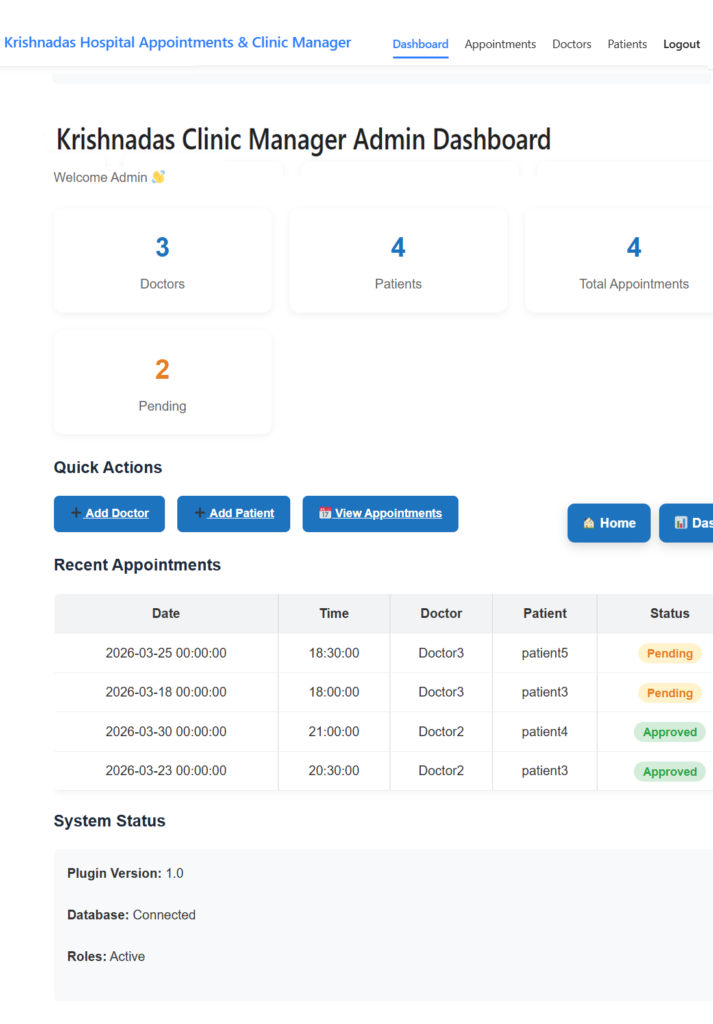
Krishnadas Hospital Appointments & Clinic Manager helps you manage doctors, patients, and appointments easily — all inside WordPress. Try Live Demo . see all features
You can also improve scheduling using our appointment booking plugin and manage patient records using our patient management plugin.
Why Clinics Need a Management System?
Running a clinic involves handling appointments, patient records, and doctor schedules daily.
Without a proper system, clinics face:
- Appointment scheduling issues
- Patient data mismanagement
- Manual errors
- Time-consuming operations
What is a Clinic Management System WordPress Plugin?
A clinic management system WordPress plugin allows you to manage your clinic directly from your website.
It helps you automate appointments, maintain patient records, and manage doctors efficiently without external software.
Key Features of Our Clinic Management Plugin
- ✔ Doctor Management – Add and manage doctors easily
- ✔ Patient Records – Store full patient history
- ✔ Appointment Booking – Smart scheduling system
- ✔ Role-Based Dashboard – Admin, Doctor, Patient
- ✔ Secure System – Built using WordPress standards
- ✔ Mobile Friendly – Works on all devices
How to Use This Plugin?
Setting up your clinic management system is simple:
Steps:
- Install the plugin
- Add doctors
- Add patients
- Start booking appointment
Want to see how it works?
Why Choose This Plugin?
- ⚡ Easy to use interface
- 🔒 Secure and reliable
- 🚀 No external software required
- 📱 Mobile responsive design
Start Managing Your Clinic Today
Download the plugin and simplify your clinic operations.
Explore More
Frequently Asked Questions
Is this plugin free?
👉 Yes, a free version is available.
Can I use it for small clinics?
👉 Yes, it works perfectly for small and large clinics.
Does it support appointment booking?
👉 Yes, it includes a complete booking system.